Microsoft has quietly confirmed that a Windows 11 permission-logging file can grow out of control, with user reports as high as roughly 500GB. The fix shipped in optional update KB5095093 and is expected to reach everyone in the July 2026 Patch Tuesday update.
A Windows 11 bug is silently eating disk space through a single hidden file, and Microsoft's only acknowledgment so far is one line in a patch changelog, according to reporting by Windows Latest.
The file is CapabilityAccessManager.db-wal, found in C:\ProgramData\Microsoft\Windows\CapabilityAccessManager. It is the write-ahead log for the database Windows uses to record app access to privacy-sensitive features such as the camera, microphone, location, and screen capture.
A write-ahead log is supposed to grow temporarily and then merge back into the main database. Windows Latest reports that on affected systems this merge is not happening properly, so the log keeps accumulating entries until the system drive runs out of space. For comparison, the outlet found the entire folder sitting under 4MB on a healthy machine, with the log file itself around 1.6MB.
User reports show the scale of the problem. A post on Microsoft's Feedback Hub described the file reaching about 200GB. A thread on Reddit's r/techsupport included a case where the disk analyzer TreeSize showed roughly 513GB, while other users in the same thread reported 70GB, 110GB, and 200GB. Windows Latest says 500GB is the largest figure it has seen, and that reports date back to earlier this year, including from Windows Insiders.
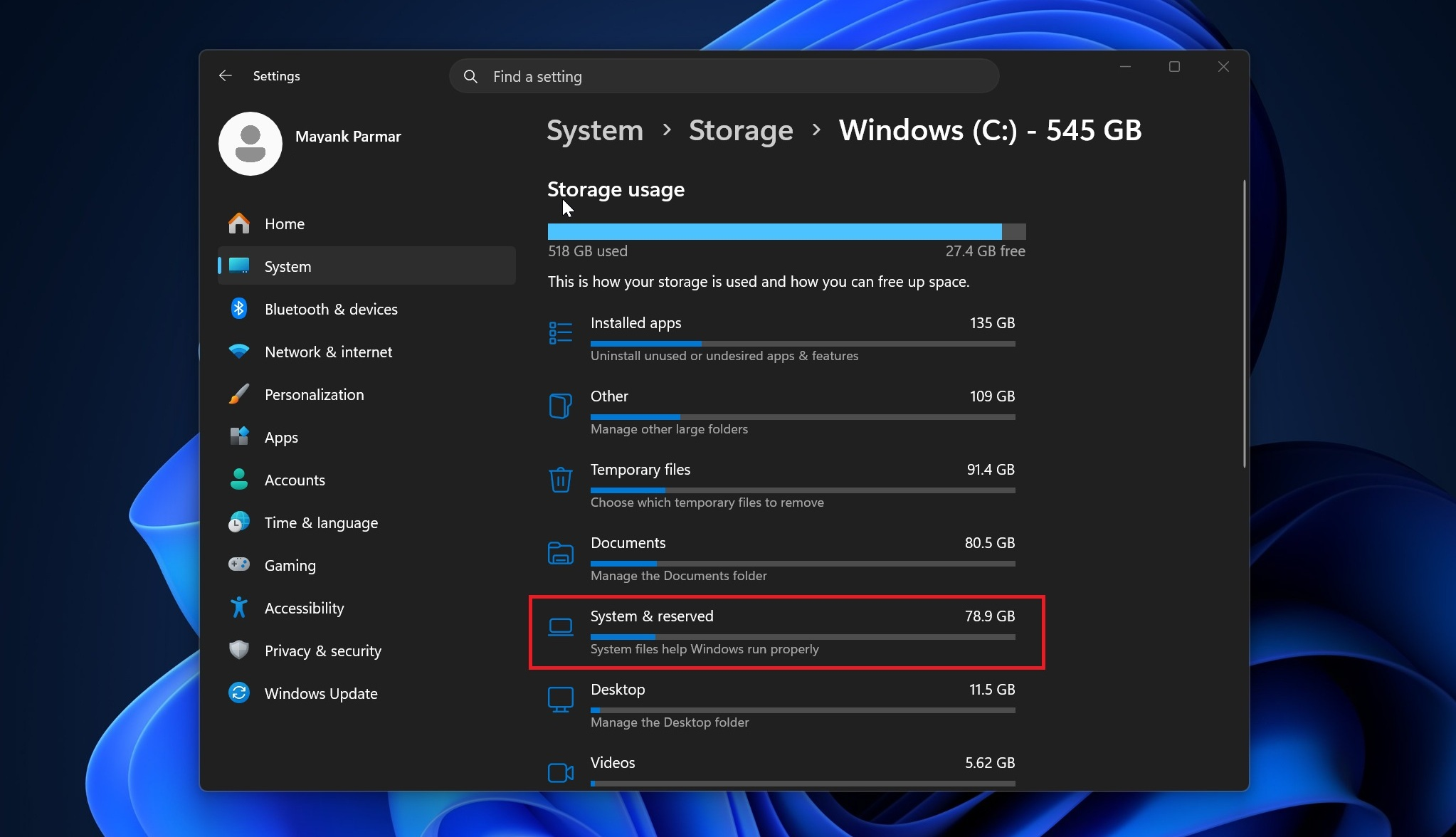
The bug is also unusually hard to spot. Windows reports the usage under the generic "System files" category inside "System & Reserved" in Storage settings, with no indication of which file is responsible. The folder itself is protected, so File Explorer and PowerShell can return "Access denied" when users try to investigate.
Microsoft has not listed the problem as a known issue on the Windows release health dashboard. Instead, the release notes for KB5095093, the June 2026 optional update, were quietly updated on June 29 with a single line saying the update improves disk space usage for the CapabilityAccessManager.db-wal file. There is no postmortem, no description of symptoms, and no explanation of why the file was allowed to grow unchecked. Windows Latest says it understands the regression traces back to a Windows 11 update released in February or March 2026, and that severity varies depending on which apps a user runs.
The fix
Open Settings, then Storage, then Show more categories, then System & Reserved. If System files show hundreds of gigabytes, the machine is likely affected. Windows Latest recommends a read-only robocopy listing from an elevated Command Prompt to check file sizes inside the protected folder without changing any permissions.
The safest fix is installing KB5095093 through Windows Update, or waiting for the July Patch Tuesday update, expected July 14, where the fix should arrive automatically. If the drive is already too full for updates to install, the workaround described by Windows Latest is renaming the oversized .db-wal file from the Windows Recovery Environment or Safe Mode, then letting Windows regenerate a fresh one. Deleting system files from a running installation is not recommended.
Get the ICD Newsletter
Subscribe for source-forward cyber news, OSINT notes, breach updates, and analysis. Have evidence or a lead? Send it to ICD.